

Features
-
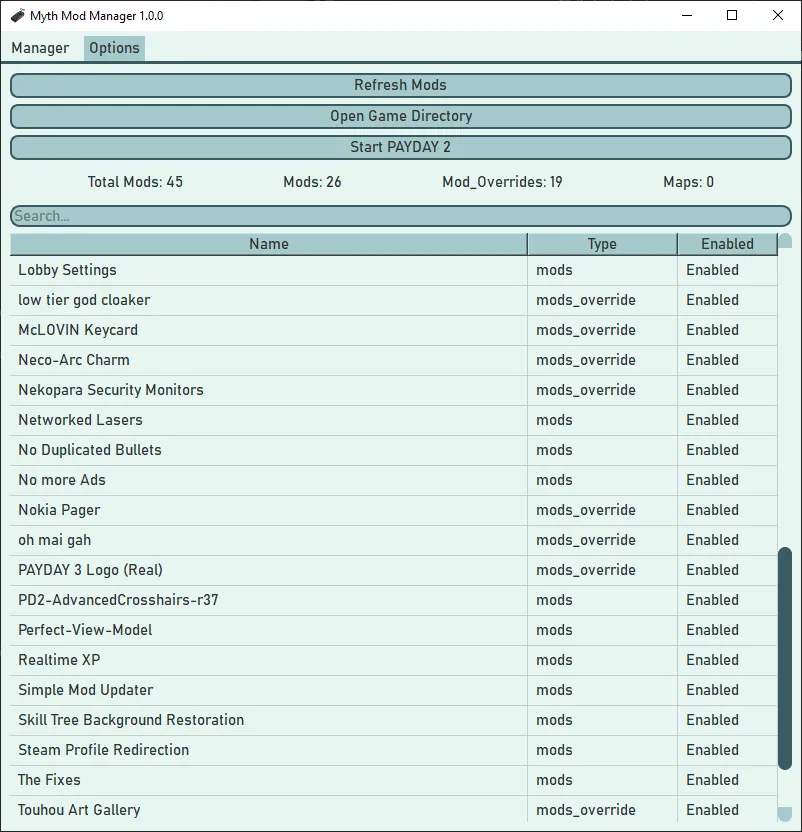
Disable mods you don't want to use at the moment.
- This feature is good for testing out which mod is crashing the game!
-
External tools tab to have shortcuts to modding tools in one place
-
Search bar to find the installed mod you're looking for in seconds.
-
Create profiles to organize your mods.
-
Add tags to mods
-
Delete mods from your computer.
-
Automatic installation by dragging and dropping files into the program.
-
This also includes automatic unzipping.
-
You still have to choose what type of mod it is (mods, mod_overrides, maps)
-
-
Easy to access buttons for your game directory, crash logs, and starting the game.
-
Backup all of your mods and package it into a compressed file.
-
Auto detects and installs Myth Mod Manager updates.
Supported Platforms
Regarding OS
Windows:
- It is recommended to use windows 10 or higher
- Windows 7 is not supported
Linux:
- Linux is supported
MacOS:
- MacOS is currently unsupported
Regarding Storefront
Both steam and epic games should work.
Supported Languages
Most languages are machine-translated, if you are fluent in one of these languages please reach out!
Deutsch, English, Español (españa), Français, Italiano, 日本語, 한국인, Nederlands, Polski, Português (Brasil), Русский, 中文(简体)
More Information
Some anti-virus programs detect trojans in Myth Mod Manager. This is a false positive, for more information:
https://github.com/Wolfmyths/Myth-Mod-Manager#anti-virus-false-positives-and-building-the-exe-yourself
This project is maintained at https://github.com/Wolfmyths/Myth-Mod-Manager
More up-to-date information will be posted there first
The project is open-source, so if an issue is posted on github feel free to contribute!
It is written in Python 3.11 with the PySide6 UI Framework!


Ye i was happy when a saw this but a website says this about it:
DeepInstinct: MALICIOUS
Microsoft: Program:Win32/Wacapew.C!ml
Don't know if i whant to run it or it is just that it is using stuff that seems like it is bad.
Oh and my computer warned me to not run the program.
I'm not sure if there's a fix for this I'll have to look into it.
Windows typically warns users from launching executables from unknown sources like me.
But don't worry it's not a virus. My code is open source and the executable is built in github, not on my system.
I did a little more research and these devs have a similar issue.
https://github.com/pyinstaller/pyinstaller/issues/5668
I'll post an issue on the github about it and I do some more research when I can
@wolfmyths @xgamer2546 Virus detection can be done multiple ways; signature detection is a common way, but also has false positives often because it's just recognizing a string of data that could be a part of any program. Any kind of file management, especially including deletion, is very prone to detection because it's able to target any file rather than only a "hard coded" path that can't change on demand.
A good test is VirusTotal, which will use many different anti-virus/anti-malware to scan. In this case 1 out of 63 programs consider the program malicious in ZIP format: MS Defender. As an EXE 2 of 70 consider it malicious, again MS Defender being one and the other something called "DeepInstinct" (lots of "random" programs come and go in VirusTotal).
Haven't looked through the source, but based on a cursory glance in VT Behavior tab it doesn't seem like it's outright malicious.
It is suspicious as hell that it's connecting to "fp2e7a.wpc.2be4.phicdn.net" and "fp2e7a.wpc.phicdn.net" despite not saying anything about sharing our data, which is all I can imagine it's doing as IDK what this is but it's listed in some bad-looking stuff on GitHub. Probably something added from one of the many third-party libraries that are used to make it work as neither of these web addresses seem to be in the code itself.So, my recommendation would be to not download or run this, especially considering it's not even actually doing any of the work yet (still have to manually decompress and decide where it goes).As a fellow hobby programmer I understand the desire to get it released ASAP so people can use it, but with no functionality it's really a skeleton of itself at best yet, so should still be alpha or beta.@thomasblaze
Read the list of 3rd party imports here: https://github.com/Wolfmyths/Myth-Mod-Manager/blob/main/requirements.txt
The only time Myth Mod Manager connects to the internet is on startup to check if the latest version is being used.
Check
checkUpdate()in https://github.com/Wolfmyths/Myth-Mod-Manager/blob/main/src/errorChecking.pyAnd my program does have functionality as said in the features, it's basically a glorified file manager with the purpose of streamlining installing and managing payday 2 mods.
@thomasblaze
Upon a google search I found this this issue on github that has the exact false positive from the suspicious links above.
https://github.com/hoshsadiq/adblock-nocoin-list/issues/452
These links are used by a legit service.
@xgamer2546 it is only natural for Windows to warn you to not run the program, as it is new so Windows SmartScreen nor Windows Defender recognize its hashes.
As for that virus detection, it is rather common false positive with Python-based programs that haven't been whitelisted by AVs. Of course I can't say for sure if this program is safe to use, but you can always compile it yourself because it is open-source
<@148101>
Okay this is gonna be my last reply to this topic, this is indeed a false positive.
It is possible to fix Microsoft's warnings but It's gonna take some time.
Everything is documented here in the link below on why this happens if you're still on the fence.
https://github.com/Wolfmyths/Myth-Mod-Manager/issues/22
@wolfmyths Good work, detective. Sorry for my stupidity.
@wolfmyths Thanks for the responses i was away for i few days so i didnt se them. But thanks for you trying to fix it for no more confusions/worries. I now know it is safe to run and I am happy for it. This mod is awsome