ENGLISH
🏠 Shelter Freeze & Recovery
The salvation for exhausted survivors!
Everyone knows the feeling: You're coming back from a long, dangerous route.
You're at the end of your strength, almost crawling on all fours to the saving shelter.
Your mental stress is at its limit, hunger and thirst are gnawing at you, but you still urgently need to sort and safely store your valuable loot.
At this moment, the stress is at its peak.
This mod solves this problem. Your shelter becomes a true sanctuary where you can finally catch your breath.
✨ What this mod does:
Instant Recovery: As soon as you enter your shelter (cabin, tent, bunker, etc.), health, energy (food), hydration (drink), and your mental state are immediately set to 100%.
Stat Freeze: As long as you are inside the shelter, these values will not decrease. You can take all the time in the world to organize your inventory or plan your next steps.
Body Temperature: Your temperature is kept stable at a healthy 36.6°C while in the shelter.
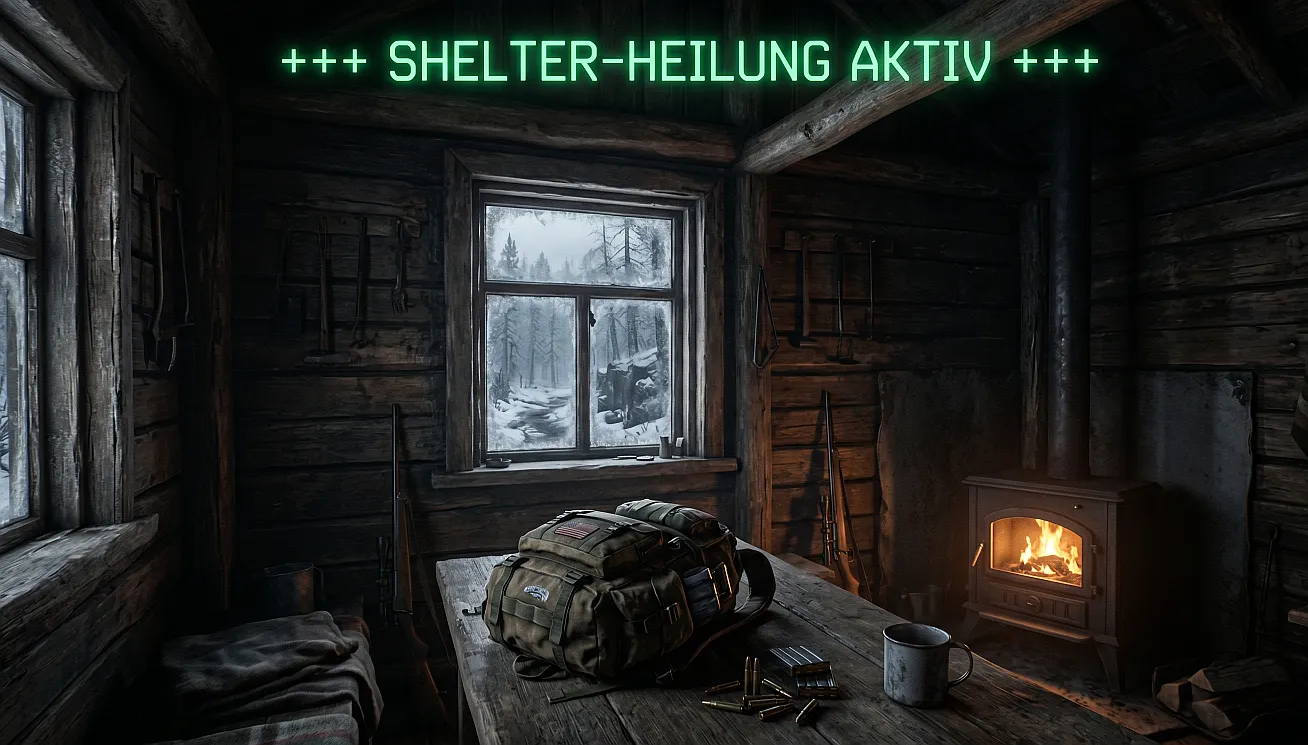
Visual Feedback: A neon-green text "+++ SHELTER HEALING ACTIVE +++" confirms that you are safe (can be turned off via MCM).
📥 Installation:
Ensure that the Road to Vostok Mod Loader is installed.
Download the file ShelterFreeze.vmz.
Important: You do NOT need to extract the downloaded file!
Place the file (.zip/.vmz) into your mods folder in the game directory.
Spoiler!
Note: If the mods folder does not exist yet, simply create it yourself.
Start the game. The mod loader should now show "Shelter Freeze" in the list.
⚙️ Settings (MCM):
If you have the Mod Configuration Menu (MCM) installed, you can toggle the green screen display on or off under the "Shelter Freeze" tab if you want full immersion without text.
🌍 For Translators:
This mod is multi-language ready! If you use your own language mod, simply add these keys to your translation_XX.json:
"SHELTER_FREEZE_UI_MSG": "+++ SHELTER HEALING ACTIVE +++",
"SHELTER_FREEZE_MCM_DESC": "Healing and stats freeze in shelters.",
"SHELTER_FREEZE_MCM_SETTING": "Show message",
"SHELTER_FREEZE_MCM_TOOLTIP": "Shows the green text while in a shelter."
🛠 Requirements:
- Road to Vostok (Current Version)
- Mod Loader
- Mod Configuration Menu (MCM) (optional for settings)
💡 A word from the developer:
This mod was born out of the necessity to finally have a place to feel safe after a long tour.
No more stress when unloading—focus on your loot and your preparation!
DEUTSCH
Spoiler!
🏠 Shelter Freeze & Recovery
Die Rettung für erschöpfte Überlebende!
Jeder kennt es: Du kommst von einer langen, gefährlichen Route zurück.
Du bist am Ende deiner Kräfte, kriechst fast nur noch auf allen Vieren zum rettenden Shelter.
Deine mentale Belastung ist am Limit, Hunger und Durst nagen an dir, aber du musst noch dringend deinen wertvollen Loot sortieren und sicher verstauen.
In diesem Moment ist der Stress am größten.
Diese Mod löst dieses Problem. Dein Shelter wird zu einem echten Rückzugsort, an dem du durchatmen kannst.
✨ Was diese Mod macht:
Sofortige Erholung: Sobald du deinen Shelter (Hütte, Zelt, Bunker etc.) betrittst, werden Gesundheit, Energie (Essen), Hydrierung (Trinken) und deine mentale Verfassung sofort auf 100% gesetzt.
**Werte-Freeze: **Solange du dich im Shelter befindest, sinken diese Werte nicht. Du kannst dir also alle Zeit der Welt lassen, um dein Inventar zu ordnen oder deine nächsten Schritte zu planen.
**Körpertemperatur: **Deine Temperatur wird im Shelter stabil auf gesunden 36.6°C gehalten.
Visuelles Feedback: Ein giftgrüner Text "+++ SHELTER-HEILUNG AKTIV +++" bestätigt dir, dass du sicher bist (über MCM abschaltbar).
📥 Installation:
Stelle sicher, dass der Road to Vostok Mod Loader installiert ist.
Lade die Datei ShelterFreeze.vmz herunter.
Wichtig: Du musst die heruntergeladene Datei NICHT entpacken!
Lege die Datei (.zip/.vmz) in deinen Mods-Ordner im Spielverzeichnis.
Hinweis: Wenn der Ordner mods noch nicht existiert, erstelle ihn einfach selbst.
Starte das Spiel. Der Mod-Loader sollte "Shelter Freeze" nun in der Liste anzeigen.
⚙️ Einstellungen (MCM):
Wenn du das Mod Configuration Menu (MCM) installiert hast, kannst du unter dem Reiter "Shelter Freeze" die grüne Bildschirmanzeige ein- oder ausschalten, falls du volle Immersion ohne Text möchtest.
🌍 Für Übersetzer / For Translators:
Diese Mod ist Multi-Language-Ready! Wenn du eine eigene Sprach-Mod nutzt, füge einfach diese Keys in deine translation_XX.json ein:
JSON
"SHELTER_FREEZE_UI_MSG": "+++ SHELTER-HEILUNG AKTIV +++",
"SHELTER_FREEZE_MCM_DESC": "Heilung und Stats-Freeze in Unterkünften.",
"SHELTER_FREEZE_MCM_SETTING": "Meldung anzeigen",
"SHELTER_FREEZE_MCM_TOOLTIP": "Zeigt den grünen Text im Shelter an."
🛠 Anforderungen:
- Road to Vostok (Aktuelle Version)
- Mod Loader
- Mod Configuration Menu (MCM) (optional für Einstellungen)
💡 Ein Wort vom Entwickler:
Diese Mod entstand aus der Notwendigkeit heraus, nach einer langen Tour endlich einen Ort zu haben, an dem man sich sicher fühlen kann.
Kein Stress mehr beim Ausladen konzentriere dich auf deinen Loot und deine Vorbereitung!