Alive Timer — Road to Vostok Mod
Requested by Eroktic.
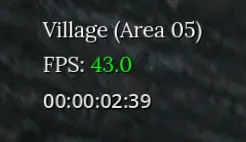
A GAMMA-style survival timer for Road to Vostok displaying how long your
character has been alive in DD:hh:mm:ss format (or hh:mm:ss until reaching
24 hours), positioned beneath the FPS counter.
Features
-
HUD Integration: Plain text matching the game's FPS widget font size, no
panel/border by default. Automatically hides during main menu, pause menu,
settings, MCM, and loading screens. -
Pause Behavior: The clock freezes during pause, death, loading screens,
and optionally within safe shelters. -
Auto-Reset Functionality: Automatically detects new characters and
permadeath wipes by monitoring RTV's save files, resetting the clock to
zero for each character. -
Profile Support: Compatible with
Patty's Profiles, maintaining separate
elapsed time per profile with automatic reloading and cleanup. -
Rebindable Controls: Two hotkeys —
F10to toggle visibility andF8
(press twice within 1.5 seconds) to reset the timer. -
MCM Customization: Configure position, font size, color, opacity,
background styling, and behavioral toggles with live preview.
Installation
Required:
- A mod loader —
Metro Mod Loader,
VostokMods, or
RTV Mod Loader.
Strongly Recommended:
Steps:
- Place
AliveTimer.vmzinto<Road to Vostok>/mods/ - Launch the game and verify the log shows successful loading
Optional:
- Patty's Profiles for per-profile timer
tracking
Default Hotkeys
| Key | Action |
|---|---|
F10 |
Toggle timer visibility |
F8 |
Reset timer (confirm with second press within 1.5s) |
MCM Settings
Access via Road to Vostok Settings → Alive Timer:
- Position: Horizontal and vertical margins
- Appearance: Font size, text color, opacity, optional background pill
- Behavior:
- Hide days while under 24 hours (default: on)
- Hide seconds (default: off)
- Pause in safe areas (default: on)
- Reset on death (default: on)
- Reset on new game (default: on)
- Controls: Rebindable visibility and reset keys
Compatibility
The mod operates independently with its own CanvasLayer, doesn't override RTV
scripts, and doesn't modify save files — only monitoring character data for
detection purposes.
Uninstall
Delete AliveTimer.vmz from the mods folder. Optional: remove saved state
from AppData directories.
Technical Notes
- Performance: Minimal per-frame overhead with throttled file polling
- Safety: Fail-closed detection prevents crashes; frame-time deltas are
clamped - State Storage: Elapsed time stored in
user://AliveTimer/state.cfg;
MCM settings inuser://MCM/AliveTimer/config.ini - Manual Reset: Confirmation prompt prevents accidental resets
Issues / feedback
Open an issue on the mod's ModWorkshop page or post in the Road to Vostok
modding Discord.