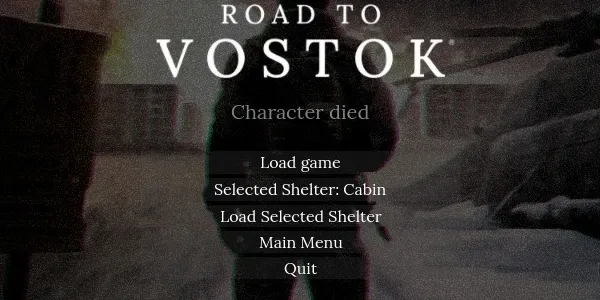
Adds a lightweight respawn shelter selector to the death screen.
Instead of always loading the default shelter chosen by the game, this mod lets you cycle through visited shelters and manually choose where to respawn.
Use the top button to change the selected shelter and the bottom button to load it. Vanilla Load Game still works normally.
It also adds the same selector to the main menu if the player died and returned to menu before respawning.
Note: shelters visited before installing this mod must be visited again or added manually to the config. See Manual config below.
Features
Adds Selected Shelter button to the death screen
Adds Load Selected Shelter button under the normal load button
Adds the same buttons to the main menu when a respawn is still pending
Uses the game’s normal shelter loading flow
Defaults to the same shelter vanilla would select
Tracks visited shelters in a separate mod config for better compatibility
Supports Patty’s Profiles
Patty’s Profiles compatibility
This mod supports Patty’s Profiles and stores its own state per profile.
Everything works except cloning — cloning will not copy your visited shelter progress.
Workaround
If you want to preserve Shelter Select Mod progress in a cloned profile, manually copy the ShelterSelectMod folder from the old profile folder into the new one.
This may be improved later if Patty’s Profiles fixes its profile sync bug.
Manual config
The mod creates:
state.cfg
README.txt
These files are usually located in one of these folders:
Roaming\Road to Vostok\ShelterSelectMod
Roaming\Road to Vostok\profiles\"profile number"\ShelterSelectMod
The README includes the list of valid shelter names and explains how to manually edit visited shelters if needed.
Other mods compatibility
This mod does not override any game scripts, so it should work with almost any other mod.
Known limitations
Profile cloning in Patty’s Profiles does not currently copy Shelter Select Mod state automatically
Shelters visited before installing this mod will not appear until you visit them again or manually add them to config
Final note
This is my first mod, so expect unexpected behavior.
AI was used heavily during development — ChatGPT was the main programming help for this mod.