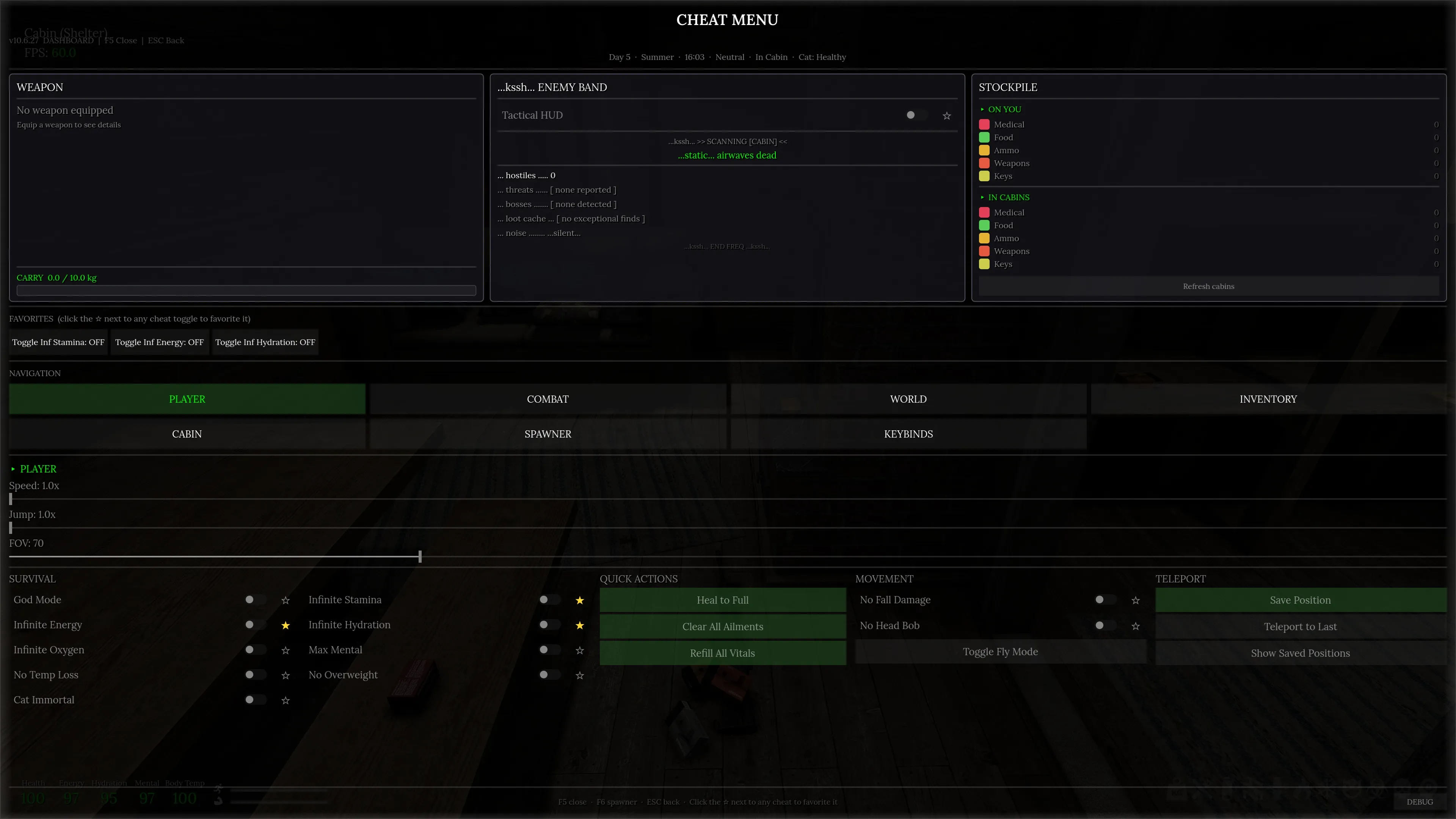
Cheat Menu for Road to Vostok
A full-featured cheat menu and item spawner built for Road to Vostok. This mod gives you complete control over the game's systems, survival stats, movement, weapons, time, weather, inventory management, and cabin organization; all from an in-game UI that matches the game's native look and feel.
This mod is new, still in development and testing. This is for anyone who wants to just mess around with the game and doesn't have a lot of time to grind for stuff.
What's New in v10.2
New Features
- Dashboard-First UI: F5 now opens a full-screen landing page with live stat cards, a favorites strip, and inline category content instead of the old cramped tabbed panel.
- Tactical HUD: toggleable in-game overlay showing nearby AI contacts with distance, bearing, state, weapon, and boss indicators. Auto-hides when you open any game menu.
- Intel Card: dashboard card with a real-time threat breakdown, dominant-direction banner, and a loot bulletin for high-rarity items in the current map.
- Real Time Sync: new World tab toggle that pins the in-game clock to your system time, stays accurate to the minute, persists across sessions, auto-disables on manual override, and handles the midnight day rollover.
- Debug Log: DEBUG button in the dashboard footer opens a live in-game log panel with Pause, Clear, and Copy-to-clipboard.
- Stockpile Card: dashboard tile showing live item counts on you and across every cabin storage container.
- Cabin Storage Browser: full-screen browser for every cabin container with search, category filtering, and direct item editing.
- Full Keybind Rebinding: new Keys tab where every cheat toggle and action can be mapped to any key, saved across sessions.
- Painted World Tab: custom backgrounds for every time-of-day, season, and weather preset.
- Favoritable Cheats: click the star next to any cheat to pin it to the dashboard favorites strip for one-click access.
- Auto-Update Support: the mod loader now detects new versions and offers one-click updates from ModWorkshop.
Fixes
- All cheats now properly clean up when toggled off, even when they're the last active cheat. Craft Anywhere, No Recoil, No Fall Damage, No Head Bob, Speed, Jump, and FOV all restore their original values immediately on disable.
- Cheat toggles restored from saved settings now display as checked the first time you open their category.
- World tab layout: Season, Time, and Weather button rows share a horizontal baseline. Player tab: SURVIVAL cheats in a 2-column grid, no scrolling.
Requirements
- Road to Vostok (Steam version)
- RTV Mod Loader: the community mod framework that enables .vmz mod loading
The mod loader is what reads the .vmz file and registers it as a game autoload. Without it, the game ignores the mod entirely.
Installation
REQUIRED: Install RTV Mod Loader if you haven't already. Follow the RTV Mod Loader setup instructions, this installs the necessary files into your game directory and AppData folder that allow the game to load mods. (https://modworkshop.net/mod/49779)
Download CheatMenu.vmz and place it in your game's mods folder:
Steam\steamapps\common\Road to Vostok\mods\CheatMenu.vmz
If the mods folder doesn't exist, create it.
Launch the game. The mod loads automatically. You'll see confirmation in the game log:
[CheatMenu] v10.2.0 loaded — F5 dashboard | F6 spawner | ESC close
Press F5 to open the Dashboard. Press F6 to open the Spawner directly. ESC closes whatever's open.
Uninstalling
Delete CheatMenu.vmz from the mods folder. That's it. The mod doesn't write any files to disk or modify any game data permanently. All changes are in-memory only, restarting the game restores everything to default.
If you used the mod to spawn items or modify your inventory, those changes persist through the game's normal save system (same as if you picked up or used items normally). The mod itself leaves no trace.
WARNING: ALWAYS BACK UP YOUR GAME FILES BEFORE USING GAME ALTERING MODS. PLEASE CREATE A BACKUP OF YOUR SAVES.
Controls
| Key | Action |
|---|---|
| F5 | Toggle Dashboard / Cheat Menu |
| F6 | Toggle Item Spawner |
| ESC | Close active menu |
Both menus freeze the game and show the mouse cursor. Closing them returns control to the player immediately. All keybinds can be rebound in the Keys tab.
Features
Dashboard (F5)
The dashboard is the main landing page. It shows three live-updating cards at the top (Weapon, Intel, Stockpile), a favorites strip for your most-used cheats, and inline category content below. Everything updates in real time while the menu is open.
Weapon Card: Shows your currently equipped weapon, its stats, carry weight, and ammo counts by caliber.
Intel Card: Live threat report showing enemy count, dominant direction, nearest contact, and a loot bulletin for high-rarity items on the current map. The Tactical HUD toggle lives here too.
Stockpile Card: Item counts for what you're carrying and what's stored across all cabin containers.
Favorites Strip: Click the star next to any cheat toggle to pin it here. Left-click toggles, right-click removes. Up to 10 favorites.
Navigation Row: Click any category (Player, Combat, World, Inventory, Cabin) to load it inline below the cards. Click Spawner or Keybinds to open them in a full sub-panel.
Tactical HUD
A persistent in-game overlay anchored to the top-right corner. When enabled, it shows live data for every AI contact in range: distance, compass bearing, state (idle, patrol, alert, combat), weapon type, health, and boss status. Hides automatically when you open any menu (inventory, crafting, map, the cheat menu itself) and comes back when you close it. Only shows when there are enemies nearby and you're not in your shelter.
Toggle it from the Intel card on the dashboard or bind it to a key in the Keys tab.
Player Tab
Survival Toggles
- God Mode: Health locked at 100. Can't die, can't bleed, can't burn, can't take any damage.
- Infinite Stamina: Body and arm stamina stay full. Sprint forever, hold aim indefinitely.
- Infinite Energy: Food meter stays at 100. No starvation.
- Infinite Hydration: Water meter stays at 100. No dehydration.
- Infinite Oxygen: Oxygen stays full. Swim underwater as long as you want.
- Max Mental: Sanity locked at 100. No insanity effects.
- No Temp Loss: Body temperature stays at 100. No frostbite, no freezing.
- No Overweight: Weight penalty disabled. Carry as much as you want.
- Cat Immortal: Your companion cat's health stays at 100. Cat can't die.
Quick Actions
- Heal to Full: Instantly restores health to 100 and clears death state.
- Clear All Ailments: Removes every status effect: bleeding, fracture, burn, frostbite, insanity, starvation, dehydration, rupture, headshot injury, and burning.
- Refill All Vitals: Sets health, energy, hydration, mental, temperature, stamina, and oxygen all to 100.
Movement
- Speed Slider (1x to 10x): Multiplies walk, sprint, and crouch speed.
- Jump Slider (1x to 5x): Multiplies jump height.
- No Fall Damage: Sets the fall damage threshold to effectively infinite. Jump from any height.
- No Head Bob: Disables the camera head bobbing effect while walking and sprinting.
- Toggle Fly Mode: Enables the game's built-in fly/noclip mode. Move freely through the world.
Camera
- FOV Slider (50 to 120): Adjusts the base field of view. Default is 70.
Teleport
- Save Position: Bookmarks your current location. Stores up to 5 positions (oldest drops off).
- Teleport to Last: Instantly moves you to the most recently saved position.
- Show Saved Positions: Displays all bookmarked coordinates.
Combat Tab
Weapon Cheats
- No Recoil: Eliminates all sources of weapon recoil. This covers the weapon's recoil data, the recoil node's live rotation, the camera noise shake, the weapon rig noise, and the Riser body rise that tilts the camera upward when firing. Six separate systems zeroed simultaneously. Toggles clean, original values are saved per-weapon and restored when you turn it off.
- Infinite Ammo: Keeps the magazine of your currently drawn weapon at full capacity with a round chambered. Reads from the actual equipped weapon's SlotData through the rig manager, not from a guess.
- No Weapon Jam: Clears the jammed state every frame. Your weapon never malfunctions.
- Craft Anywhere: Sets the heat source and workbench proximity flags to true every frame. Craft anything from anywhere without needing to stand next to a bench or fire. Only affects recipes that actually require proximity (bandages and basic repairs don't need it).
Economy
- Restock All Traders: Forces all trader NPCs to regenerate their supply inventory. Useful when they've run out of what you need.
Now supports soft dependency for the Wallet & Cash Economy mod.
World Tab
Time
- Live Time Display: Shows the current in-game time, time of day (Dawn/Day/Dusk/Night), day number, season, and weather. Updates in real time.
- Time Slider: Drag to set the time anywhere from 00:00 to 24:00. The sun and moon move immediately.
- Preset Buttons: One-click painted buttons: Dawn (5:50), Noon (12:00), Dusk (17:50), Night (22:00). Each has custom hand-painted artwork.
- Freeze Time: Stops time progression completely by setting the simulation rate to zero.
- Time Speed Slider (1x to 20x): Multiplies how fast time passes.
- Real Time Sync: Pins the in-game clock to your actual system time. Toggle it on, and 2:30 PM on your watch means 2:30 PM in the game. Stays accurate to the exact minute. Persists across sessions so you don't have to re-enable it every time you load in. Auto-disables if you manually drag the time slider or click a preset.
Season
- Summer / Winter buttons: Switches the season instantly. Each has custom painted artwork matching the time and weather buttons.
Weather
- Seven weather presets: Neutral, Rain, Storm, Overcast, Fog, Wind, Aurora. Each has custom hand-painted button art with animated shader overlays (rain streaks, storm flashes, aurora shimmer). Sets the weather and locks it by pushing the weather change timer far out.
Inventory Tab
- Sort Inventory (by Type): Picks every item out of your inventory grid, sorts them by category (Weapons first, then Ammo, Attachments, Armor, down to Misc), with larger items placed first for better Tetris packing, then places them all back. Tries both orientations for each item.
- Sort Inventory (by Weight): Same algorithm but sorted heaviest-first.
- Stack All Duplicates: Finds all stackable items of the same type and merges partial stacks. Removes empty stacks.
Cabin Tab
All cabin operations require you to be inside your shelter. They won't work on field maps; this is a safety measure to protect loot in the game world.
- Vacuum + Auto-Stash: The big one. Picks up all loose items from the floor (below 0.8m height, so items on tables and shelves stay put), stashes them directly into matching containers (consumables to the fridge, keys and personal items to the nightstand, everything else to cabinets and crates). Anything that can't fit in a container goes to your inventory. Then stashes your non-equipped inventory items into containers too. One button, clean cabin.
- Vacuum Floor Items: Just picks up floor items into your inventory without touching containers.
- Stash Inventory to Cabin: Moves non-equipped inventory items into cabin containers. Smart classification: typed containers get priority (fridge gets food, nightstand gets keys), generic containers get everything else, overflow goes anywhere with space.
- Browse Cabin Storage: Opens a full-screen browser showing every container in your cabin. Search by item name, filter by category, and move items between containers. Highlight the item, then select the Move Item button for the container you want to move the item to.
- Delete Floor Items: Destroys all loose items on the floor. Shows a confirmation dialog first. Cannot be undone.
- Return to Cabin: Saves your current game state (character, world, shelter if applicable) and loads your most recently visited shelter. Shows a confirmation dialog. Uses the game's own scene loading system with the proper loading screen.
Item Spawner (F6)
A full item catalog with 247+ items across 10 categories.
Categories: Weapons, Ammo, Medical, Food, Attachments, Equipment, Knives, Grenades, Keys, Misc
Each category has context-specific sub-filters. Weapons filter by type (Pistol, SMG, Rifle, Shotgun, etc.). Equipment filters by body slot (Head, Torso, Legs, etc.). Food filters by type (Drinks, Canned, Cooked). Attachments filter by subtype (Optic, Muzzle, Laser, Magazine).
Search: Type at least 2 characters to filter items by name across the active category.
Sort: Click Name, Weight, or Rarity to sort. Click again to reverse.
Pagination: 20 items per page with navigation.
Item Cards show the item's icon, name, type, weight, rarity, weapon stats (damage, penetration, RPM, magazine size, caliber), vital effects, medical treatments, armor protection, and equipment slots.
Weapon Spawning has four modes per weapon:
- BARE: Weapon only, no attachments, no mag or ammo.
- +MAG+AMMO: Weapon with its compatible magazine loaded to full capacity, chambered, plus 2 boxes of loose ammo.
- FULL KIT: Weapon with all compatible attachments (optic, suppressor, laser, magazine) pre-attached, loaded, plus 3 boxes of ammo.
- CUSTOMIZE: Opens a builder panel where you pick exactly which attachments to include. Radio-button selection ensures one per subtype. Builds the weapon with your choices and adds it to the inventory.
Non-weapon items get a simple SPAWN button that adds them to the inventory or drops them on the ground if the inventory is full.
Weapon Dashboard
Opens automatically with the spawner on the right side of the screen. Shows a live view of your currently equipped weapon.
- Slot Tabs: Switch between primary and secondary weapon if both are equipped.
- Weapon Display: Large icon, weapon name, type, and full stats (DMG, PEN, RPM, caliber).
- Ammo Counter: Live display of current magazine count vs max. Updates in real time.
- Fill Mag: Instantly refills the magazine to capacity and chambers a round. Works even with the menu open.
- Repair: Sets weapon condition to 100%.
- Equipped Attachments: Lists every attachment currently on the weapon with its icon. Each has a remove button.
- Available Attachments: Shows all compatible attachments grouped by subtype (Optic, Muzzle, Laser, Magazine). Items currently equipped show in green. ATTACH/REMOVE buttons for instant hot swap. Calls the game's own UpdateRig() to update the weapon model immediately.
Keybind System
Full rebinding for every cheat and action in the mod. Open the Keys tab from the dashboard navigation row.
- Every toggle and one-shot action is listed by category (Player, Combat, World, Cabin, Misc).
- Click any action's key cell, then press the key you want to bind it to.
- Bindings save to disk automatically and persist across sessions.
- Press ESC during capture to cancel without changing anything.
- Press DELETE or BACKSPACE to clear a binding.
Debug Log
Small DEBUG button in the bottom-right of the dashboard footer. Opens a floating panel that shows every log message the mod generates in real time with timestamps and color-coded severity levels.
- Pause: Freezes the display while messages keep buffering in the background.
- Clear: Wipes the buffer.
- Copy: Copies the entire log to your clipboard as plain text.
- Keeps the last 500 messages. Useful for troubleshooting or reporting bugs.
Notes
- Items spawned or inventory changes made through the mod are saved normally by the game. This is expected behavior as the mod uses the same inventory APIs as the game itself.
- All modifications are in-memory only. The mod never writes to game files. Remove the mod and restart to go back to vanilla.
- Auto-update is supported through the mod loader. You'll get notified when a new version is available.