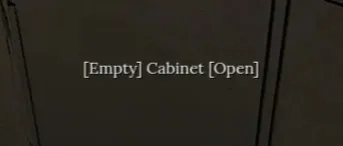
This is a basic mod that edits your interaction tooltip on LootContainers to let you know when they have items or not, without telling you what those items are. This way, you can loot much faster without ruining the surprise! It also helps with target differentiation, so you can easily tell when your crosshair (or lack thereof) has actually switched to another loot container.
Features:
- Toggle LootContainers showing [Open] or [Locked] on everything. (Default: OFF and ON, respectively)
- Display [Empty] on containers then their loot/storage are empty
- Display [Unchecked] when loot containers haven't been opened before ON/OFF
- Display [num] items inside container/furniture ON/OFF
- Display [kg] weight inside container/furniture ON/OFF
- Display [%] full inventory of container/furniture ON/OFF
- Set custom text for Empty/Unchecked scenarios (Immersion?)
- Set displayed text as prefixed or suffixed
This mod overrides res://Scripts/Interactor.gd and provides super() in _physics_process(). Interactor.gd extends RayCast3D and does not have a class_name. Therefore, it cannot be used with is conditionals. It shouldn't cause compatibility issues, but let me know if it does.
Current Version Comment:
2.1.0
Bed crash is GONE. Mod is working properly now, all MCM options are functional. No conflicts that I can find. Issue was due to an inheritance problem and a line of code I used, which would otherwise have worked just fine, happens to break because of the way we mod this game. Go figure. Let me know if you find any further issues.
1.7.0
I hate if statements so much....
1.5.1
Should fix the crashing when looking at the bed, but may also fix conflicts with demo version. I haven't been able to test this version directly yet, so let me know if the issues persist.
Dependencies:
Doink Oink's Mod Configuration Menu (optional)
Incompatibilities:
Any mod that inherits Scripts/Interactor.gd
Since this mod contains an override, when in doubt, load it first.
Installation for Metro Mod Loader:
Drag ShowEmptiness.VMZ into %steamapps%/common/Road to Vostok/mods/
Installation for VostokMods Loader:
Drag ShowEmptiness.VMZ into %appdata%/roaming/Road to Vostok/mods/
(I have no idea if this does, or ever will work. I never got VMML to work.)
Future plans:
- Line-break toggles for item info appearing above/below container name
Please be patient and check in frequently if you have issues. This is my first mod, not just for Vostok, so I'm learning the ropes on-the-fly.