
⚠ Mod was tagged as outdated!
The mod might not work as the author intended it to and might cause unwanted bugs or crashes.
This mod is a template.
It doesn't do anything by itself and only allows others to use it to create mods from it.
PAYDAY 3 Weapon Sticker's Template
Downloads401
Views2,514
Publish Date2 years ago
Last Updated2 years ago by
Version1.2.1
Tags Members
Tsuk1yaModeratorOwner
Comments
Adding this here for anyone who wishes to mod the DLC stickers. ( <@89374> , @Tsukiya)
Step 1: Edit the template
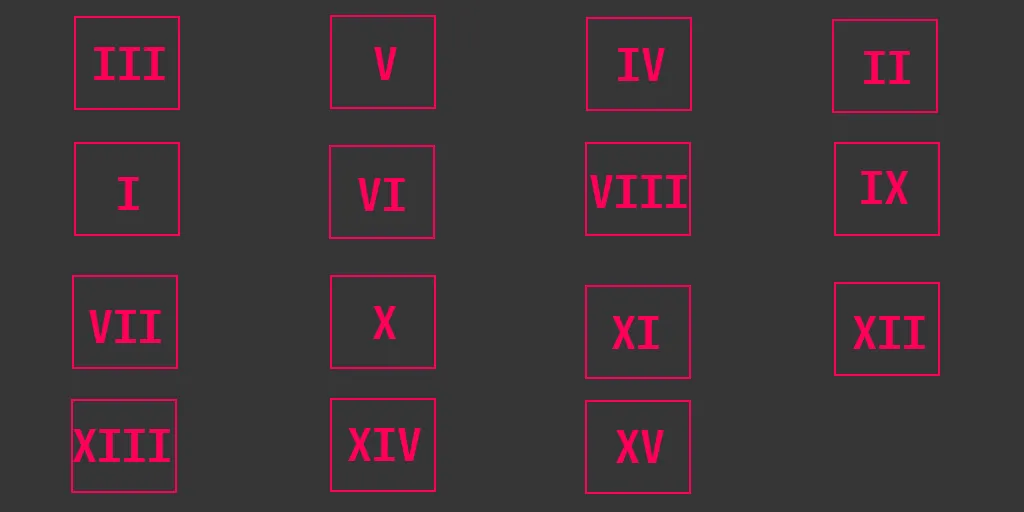
First off, you'll need to edit this template. Specifically, the UI image, or "SS_UI_Inventory_Stickers_Mods"
Copy and past one of the squares into the bottom right where spot 'XVI', or 16, would be. Line it up so it's just like the others.
Next, add your image using the same guidelines. This covers the UI portion. You do not need to rename the template. We just have to do something else to get it to show properly inside Payday 3.
For the actual sticker, I created a copy of one of the sticker templates, for example, UFO. Any one will do for the square guidelines. Add your image, and rename it to "T_Sticker_DLC00001_BSOD". This covers the sticker. Put this file anywhere for now; I will tell you where to put it later.
Step 2: Create the proper folders
Inside the template folder, create a new folder named "DLCs" under 'Content'. It should sit alongside the UI and Weapons folder. Inside this folder, create another folder named "00006-DLCWEAP0001".
After that, it's going to look a lot like the template given by Tsuk1ya; You'll need a 'Weapons' and a 'UI' folder inside of the 00006 folder. Then, keep adding folders to the two like this:
Content>DLCs>00006-DLCWEAP0001>UI>Textures>Stickers
and
Content>DLCs>00006-DLCWEAP0001>Weapons>Stickers>BSOD
Step 3: Copy and Paste the right folders.
For the UI, just copy and paste the "SS_UI_Inventory_Stickers_Mods" into the "Textures>Stickers" folder.
For the sticker to be changed in game, put your "T_Sticker_DLC00001_BSOD" into the "Weapons>Stickers" folder.
Step 4: Proceed like normal
Put the DLCs, UI, and Weapons folder into the Unreal Engine "content area", cook and pak like normal. In game, it'll change the BSOD in the UI and on the weapon.
Hope this helps ya'll; I'm willing to provide a copy of my folder to the mod maker or anyone else who needs help on Discord (Same name as on here).
I still can't get the Criminal Selection or Yours for the Taking sticker show up in my game, but oh well.
Pinned, i will look upon DLC stickers as soon as i am available.
Awesome, can't wait to add a new one to my pack. At least, as soon as I'm done with my post-New Year flu. Parties are fun, but the aftermath is not
Also, I noticed that on some weapons(mainly the DLC ones and maybe some more from the base game) stickers don't show up in-game. Like, they'll look fine in the menus but not when the character is holding them. Both in first-person and third. Will remaking the mod in UE fix this or is this something only SBZ could address?
@femboyeevee
I cook my mods through UE, so I don't think that's the issue. I know Tsuk1ya mentioned all weapons have their own rules, and making your stickers smaller may help. Haven't experimented with it on my own, so can't confirm. (Edit: Experimented a bit. Made it really small and it still wouldn't show up. IDK what the deal is, but it's SBZ)
Black Ops 3 is a weird game, but its weapon customization was really good. I wish we could move and place stickers where we wanted, and not in preset places. Don't know how hard that would be for SBZ to make tho.
@birdman_official I'm really sorry to shatter your dreams, but the gunsmith customization on BO3 is broken on PC. The skins you make don't show up in-game unfortunately. I do agree that system absolutely amazing. Just something you should know since I'm guessing you're eyeing it on PC for zombies ;)